
An AI 3D agent helps game designers by collapsing concept work and first-pass asset creation from days into minutes. You describe a character or environment piece, and the agent returns a textured mesh you can export to Unity or Unreal. Meshy AI shipped one such agent in public beta on June 4, 2026.
Where Does AI Fit in a Game Art Pipeline?
AI fits cleanly into two stages: pre-production ideation and first-pass asset blockout. It rarely touches final hero assets, and that is the right place to draw the line.
Environmental work usually runs the same way. An artist sketches ten silhouettes, the director picks two, then someone spends a week modeling a version nobody approved. Generative tools compress the front half of that loop.
The back half stays human. Someone still owns art direction, silhouette readability, and whether the asset reads at gameplay distance.
● Pre-production: rapid concept variants, style tests, blockout props for greyboxing
● Production: background clutter, modular kit pieces, filler set dressing
● Polish: hero characters, anything rigged, anything the camera lingers on
Adoption is real but not universal. Per GDC’s 2026 State of the Game Industry survey (Informa, January 29, 2026, 2,300+ respondents), 36% of game professionals use generative AI in their job.
Can AI Generate 3D Game Assets, Not Just Concept Art?
Both, and the distinction matters more than most guides admit. Most “AI for game art” articles quietly mean 2D concept images. The time savings live on the 3D side.
Text-to-3D takes a prompt and returns a mesh. Image-to-3D takes a reference photo or sketch and reconstructs geometry with textures applied. An AI 3D agent sits a layer above both, holding a conversation across several steps instead of firing once.
That conversational layer changes the workflow. You brainstorm directions, review 2D concepts in batches, then convert the one you like into geometry.
Export coverage decides whether any of this reaches your engine. Current formats include FBX, OBJ, GLB, USDZ, STL, BLEND, 3MF, and DXF, with GLB as the default.
How Do You Turn an AI-generated 3D model Into a Game-Ready Asset?
The raw output is a starting point. Budget cleanup time into every asset you plan to ship.
What Breaks First: Topology and UVs
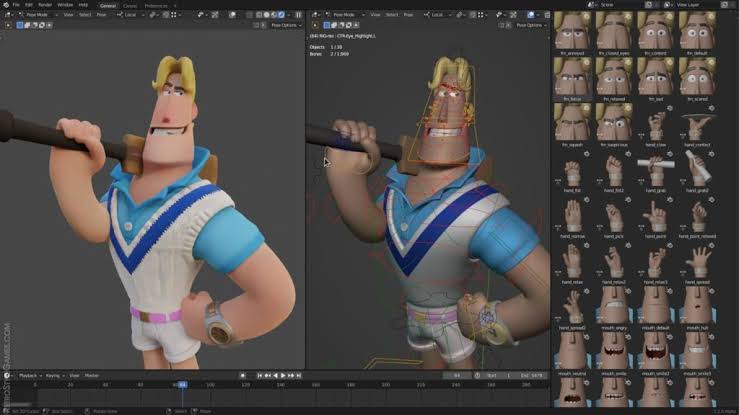
Generated meshes tend to arrive as dense triangle geometry with chaotic edge flow. Rigging and animation want quads and clean loops. Deformation on triangulated geometry looks wrong the moment a joint bends.
UVs are the second casualty. Simplify the mesh with a decimate modifier, and the texture mapping degrades with it, which means re-baking. Blender’s Selected to Active bake is the standard fix.
Why Your Model Imports at the Wrong Scale
Scale errors are the most common import complaint, and the least interesting to debug. Meshy’s own Unity guide flags three recurring issues: pink materials, wrong scale, and confusion between FBX and GLB.
Use GLB when targeting Unity 2020 and newer, since it preserves PBR material assignments on import.
● Import, then check scale against a known reference cube
● Retopologize before rigging, never after
● Re-bake textures after any decimation pass
● Set the asset to your project’s poly budget, not the generator’s default
Do You Have to Disclose AI Assets on Steam?
Yes, if the AI-generated content ships inside the game and players see it. Valve launched its disclosure requirement in January 2024 and rewrote the form on January 17, 2026.
The rewrite drew a useful line. Efficiency tools you use behind the scenes, like a coding assistant, are exempt. Content consumed by players is not.
Disclosure volume has moved fast. Roughly 7,818 Steam titles now disclose generative AI use, about 7% of the library and close to 20% of 2025 releases. Ichiro Lambe of Totally Human Media summarized the jump plainly: “We’ve octupled last year’s figure.”
Around 60% of those disclosures cite visual asset generation. If you use an agent for environment kits, you are in that bucket.
What Still Needs a Human Game Designer?
Judgment, and anything that has to survive contact with gameplay. A generator produces a plausible object. It does not know your poly budget, your art bible, or why the player needs to read that silhouette in half a second.
Sentiment inside the industry reflects that tension. In the same GDC 2026 survey, 52% of respondents called generative AI’s impact negative. That figure was 30% in 2025 and 18% the year before.
Ignoring that context is a mistake when you are hiring or pitching. The tooling question and the labor question are not separate conversations.
What Does This Change for a Small Team?
For a two-person indie team, the honest answer is prototyping speed rather than final quality. You can greybox a level with real-looking props in an afternoon.
Watch the licensing terms before you build a business on it. On Meshy AI, free-tier outputs carry a CC BY 4.0 license, which permits commercial use with attribution. The Pro plan at $20 per month moves you to private asset ownership.
One tradeoff worth stating: the 3D Agent is still in beta, limited to Pro members and above. Direct 3D editing, rigging, and animation are not in it yet.
Key Takeaways
● AI handles concepting and first-pass assets well. Hero characters and rigged meshes still need artists.
● Steam requires disclosure for AI content players see, per Valve’s January 2026 form rewrite.
● Budget retopology and texture re-baking time into every generated asset you ship.
Conclusion
An AI 3D agent earns its place as a fast blockout tool. The generation step is close to free now. Retopology, UV work, and engine integration are where your hours go. Start with background props and modular kit pieces where imperfect topology costs you nothing. Once you know your cleanup overhead per asset, you can decide whether the workflow scales to characters. Check your storefront’s disclosure rules before you commit.