
Why Texturing Is Often the Hardest Part of Making a 3D Model Look Real
Ask any 3D artist what actually eats up their time, and a lot of them won’t say modeling. They’ll say texturing. A perfectly shaped 3D object with flat, lifeless surfaces still looks like a toy, while a rough model with convincing material detail, the grain of real wood, the scuff of worn leather, the subtle imperfection of aged metal, can look genuinely believable. An AI texture generator exists specifically to close that gap faster, taking over a process that used to require real artistic skill and hours of manual work in specialized software.
What an AI Texture Generator Actually Promises
At its core, an AI texture generator produces surface material, color, roughness, and detail for a 3D model, either from a text description, a reference image, or sometimes directly analyzing the model’s geometry itself. Instead of hand-painting a texture map pixel by pixel or manually adjusting material properties in software like Substance Painter, you describe what you want, “weathered oak with visible wood grain” or “brushed steel with light scratching,” and the AI generates a texture that attempts to match that description.
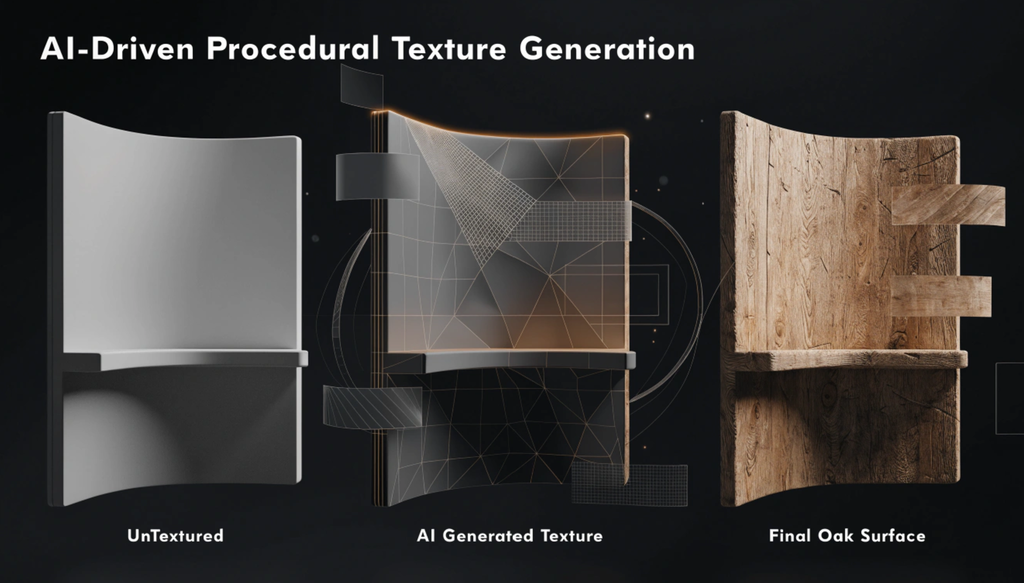
This matters because texturing has always been a specialized skill separate from modeling itself. Someone can be a capable modeler and still produce flat, unconvincing surfaces simply because texture work requires a different set of techniques entirely, understanding how light interacts with different materials, how wear patterns actually form, how color variation reads at different scales. An AI 3D model texture generator compresses a meaningful chunk of that specialized knowledge into a tool anyone can direct with a prompt.
The Actual Mechanics Behind How These Tools Generate a Texture
Most AI texture generator tools work through a process with a few recognizable stages. When working from a text prompt, the system first interprets the description, identifying the material type, color palette, and any specific detail mentioned, like rust, grain, or wear patterns. It then generates a texture map, or more often several coordinated maps, since a convincing material typically needs more than just color information.
A proper material result usually includes a base color map handling the raw color and pattern, a roughness map controlling how shiny or matte different areas appear, a normal map simulating fine surface bumps and grooves without actually changing the underlying geometry, and sometimes a height or displacement map for more pronounced surface detail. Generating all of these coordinated maps together, so they align consistently across the same surface, is a meaningfully harder technical problem than generating a single flat image, which is part of why texture generation trails slightly behind pure image generation in overall sophistication.
When an AI 3D model texture generator works directly from a model’s geometry rather than a prompt alone, it can also account for how the texture needs to wrap around actual curves and edges, attempting to avoid obvious seams or stretching where the material meets itself.
Where AI Texture Generators Genuinely Save Real Time
Game development is one of the clearest beneficiaries. Environments often need dozens or hundreds of distinct textured surfaces, walls, props, terrain, and generating a solid starting texture for each one in seconds rather than hours meaningfully changes how much a small team can realistically produce. Product visualization benefits similarly, letting someone testing a 3D product render quickly try different material options, brushed aluminum versus matte black versus glossy white, without manually creating each texture set by hand.
Architectural visualization gets real value too, since quickly texturing a building’s many surfaces, brick, concrete, glass, wood paneling, used to be one of the more tedious parts of producing a convincing render. And for hobbyists and students learning 3D work, an AI texture generator lowers the barrier considerably, letting someone focus on learning modeling or composition without needing to simultaneously master a separate, fairly technical texturing discipline just to get a presentable result.
What Makes a Free AI Texture Generator Different From a Paid One
The underlying generation technique tends to be broadly similar between free and paid tools in this space. Where the real differences show up is in resolution limits, a free AI texture generator often caps output at a lower resolution than a paid tier, which matters if your project needs high detail for close-up rendering. Usage limits are common too, restricting how many textures you can generate per day or month before hitting a wall. And the range of coordinated maps generated alongside the base texture sometimes gets trimmed on free tiers, with a paid version offering a fuller set of roughness, normal, and height maps where a free version might only provide the base color.
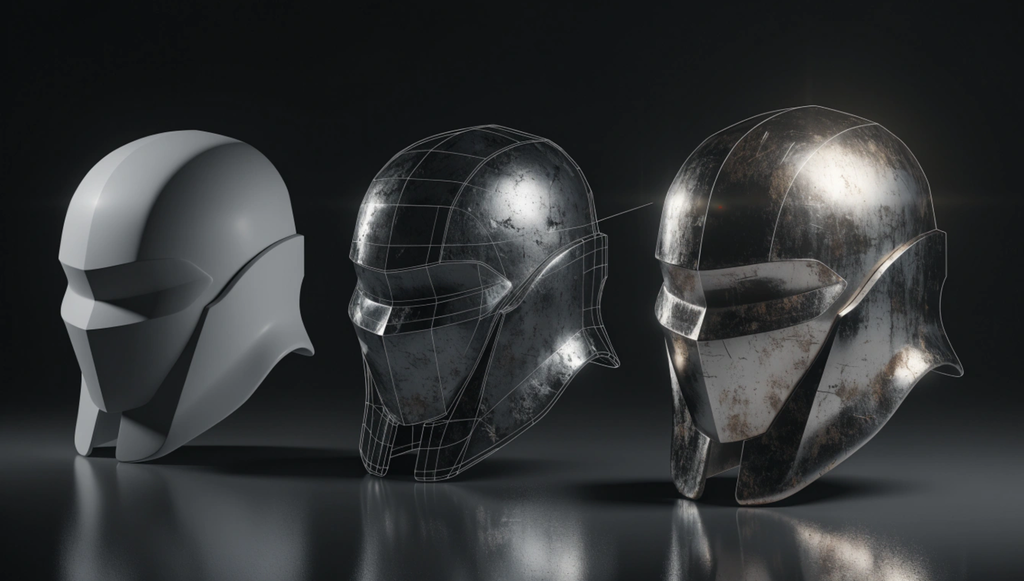
For casual projects, a single texture here and there, testing an idea, learning the basics, a free AI texture generator usually covers the need completely. The gap becomes more relevant for anyone working on a project requiring a large volume of high-resolution, production-ready textures across many different surfaces.
Where These Tools Still Fall Short
Consistency across a large, repeating texture is a common weak point. A material meant to tile seamlessly across a large surface sometimes shows visible repetition patterns or subtle inconsistencies at the seams, which a trained eye catches quickly even when a casual viewer might not notice. Highly specific or unusual material requests tend to produce less reliable results too, since these tools learned from large datasets weighted toward common materials, wood, metal, stone, fabric, and something genuinely unusual falls outside what the model has seen enough examples of to generate confidently.
Fine control is another real limitation. Getting the exact right amount of wear in the exact right places, rather than a generalized, evenly distributed weathering effect, often still requires manual touch-up in traditional texturing software after the AI generates its initial pass. And physical accuracy for materials with very specific real-world properties, certain specialized industrial coatings, for instance, isn’t something an AI texture generator can guarantee simply based on a description, since it’s generating a plausible visual match rather than referencing verified material science data.
Getting Better Results From an AI Texture Generator
Specificity in your prompt makes a real difference, the same way it does with most generative AI tools. “Metal” produces something generic. “Oxidized copper with streaks of green patina and light surface pitting” gives the AI far more to work with and produces something considerably more convincing. Generating a few variations of the same material description and picking the strongest result tends to outperform accepting the first output, since quality can vary noticeably between attempts even with an identical prompt.
Checking the full set of generated maps, not just the base color, matters too, since a texture with a beautiful color map but a flat or poorly generated roughness map will still look unconvincing once actually applied and rendered. And treating an AI-generated texture as a strong starting point rather than a finished asset, especially for anything appearing prominently or up close in a final render, keeps expectations realistic about where manual refinement is still likely needed.
The Honest Bottom Line on What This Technology Delivers Today
An AI texture generator, free or paid, has taken a genuinely specialized skill and made a solid starting result accessible to anyone who can write a clear description. For game props, quick visualizations, learning projects, and anything where a convincing-enough texture beats a flat, untextured surface, that’s a real and valuable shift. For hero assets appearing in close, prominent shots, or projects requiring precise physical material accuracy, the output is best treated as a strong first pass rather than a finished, production-ready result straight out of the generator. Knowing which of those two situations you’re actually in determines whether this technology feels like a genuine shortcut or a starting point that still needs a skilled hand to finish.